Klaviyo vs Mailchimp (2026): Which Is Better, and Which Is Cheaper?
Klaviyo vs Mailchimp in 2026: prices at every list size (checked 10 October), pros and cons, who should pick which, and when Mailchimp is the cheaper pick.

Table of contents
- Klaviyo vs Mailchimp at a Glance
- Klaviyo or Mailchimp: Who Should Pick Which
- The Core Architectural Difference: Lists vs Profiles
- Shopify Integration Depth
- Flow and Automation Capability
- Segmentation Power
- Ease of Use, Templates and Support
- SMS
- Deliverability
- Klaviyo vs Mailchimp Pricing (October 2026)
- Why is Klaviyo so expensive?
- Klaviyo vs Mailchimp: Pros and Cons
- Klaviyo pros
- Klaviyo cons
- Mailchimp pros
- Mailchimp cons
- What are the weaknesses of Klaviyo?
- Who Should Stay on Mailchimp
- The Migration Process
- The Bottom Line
- Sources
Klaviyo is the better platform for ecommerce stores that want email and SMS to drive repeat purchases. Mailchimp is the better platform, and usually the cheaper one, for newsletters, service businesses and lists that don’t need behaviour-based automation.
On price, Klaviyo and Mailchimp Standard are level up to about 5,000 contacts. Above 10,000, Mailchimp’s list price is lower, but Mailchimp bills unsubscribed contacts and Klaviyo doesn’t.
Mailchimp is not a bad product. It’s a genuinely good email tool for a specific use case. The problem is that ecommerce brands often grow into a situation where Mailchimp’s architecture starts working against them. Because the cost of switching feels high, they stay too long and pay the price in revenue, not dollars.
A note on where we stand: we’re a Klaviyo partner agency and we run Mailchimp to Klaviyo migrations, so we have a stake. That’s why the decision table below includes the cases where Mailchimp wins, and why every price on this page comes from the vendors’ own pricing pages, checked on 10 October 2026.
Klaviyo vs Mailchimp at a Glance
If you only have 30 seconds, this is the table to look at. Everything below is the why behind it.
| Klaviyo | Mailchimp | |
|---|---|---|
| Built for | Ecommerce / DTC | Newsletters, B2B, content creators |
| Data model | Unified profiles (one record per person) | Lists (same person can be duplicated across lists) |
| Shopify integration | Native, real-time, full event stream | Official app (Mailchimp Email SMS Marketing), shallower event depth |
| Predictive analytics | CLV, churn risk, next-order date, all native | Predicted CLV and purchase likelihood (Standard plan and up) |
| Flow logic | Conditional splits on any profile property or event, flow filters, cross-flow suppression, dynamic content | Automation flows (formerly Customer Journeys) with if/else and percentage splits, up to 5 conditions per split |
| Segmentation | Behaviour + predictive + product events | Tags, fields, activity, some purchase data |
| Reporting | Revenue per recipient, attributed orders, flow contribution % | Opens, clicks, store revenue when connected |
| SMS | Monthly plan priced per message (from $15 for 1,000 US toll-free texts) | Credit add-on on Essentials and up, approval required, credits expire monthly |
| Free plan | 250 profiles, 500 emails a month, flows included | 250 contacts, 500 emails a month, no automation flows |
| Price at 5,000 contacts | $100/month | $75 (Essentials) or $100 (Standard) |
| Price at 50,000 contacts | $720/month | $385 (Essentials) or $450 (Standard) |
| Pricing model | Active profiles (suppressed and unsubscribed don’t count) | Subscribed, unsubscribed and non-subscribed contacts all count |
| Sweet spot | Ecommerce stores doing $200K+/year | Sub-1,000 contacts, content businesses |
Prices in USD per month, as of 10 October 2026.
Bottom line: if email is a revenue channel for your business (not a broadcast channel), Klaviyo is built for what you’re trying to do. If you sell physical products on Shopify, the gap is usually big enough to justify the move, but model it on your own numbers first. If you want it done without breaking flows or torching deliverability, our team handles the Mailchimp to Klaviyo migration end to end.
Klaviyo or Mailchimp: Who Should Pick Which
Find the row that matches your business. The pick in the middle column is what we’d tell you in a free audit, before you paid us a cent.
| If you… | Pick | Why |
|---|---|---|
| Sell physical products and rely on abandoned cart, post-purchase or replenishment flows | Klaviyo | Flows can branch on any order, product or browsing event on the profile, and that’s where flow revenue gets made. |
| Run a Shopify store doing $500K+ a year | Klaviyo | The Shopify integration alone justifies it. |
| Have 10K+ subscribers and email is under 20% of revenue | Klaviyo | The ceiling on Mailchimp is usually what’s holding the number down. |
| Want to segment by predicted CLV, churn risk or next order date | Klaviyo | All three are native and plug straight into segments and flow filters. |
| Want SMS driven by the same order and browsing data as your email | Klaviyo | Texts can branch on the same events, segments and predictions as email, inside the same flow. |
| Run a newsletter, content site or B2B service business with under 2,000 subscribers | Mailchimp | You won’t use 80% of what you’d pay Klaviyo for. |
| Mostly send campaigns to a clean list of 10,000+ and don’t need behavioural flows | Mailchimp | Lower list price: Standard is $135 against Klaviyo’s $150 at 10,000 contacts, and $450 against $720 at 50,000. |
| Have under 500 contacts and send a few campaigns a month | Mailchimp Essentials, or either free plan | $13 a month against Klaviyo’s $20 at 500 contacts. Both free plans cover 250. |
| Sell digital products or services with no store integration | Mailchimp, or a creator tool like Kit (formerly ConvertKit) or Beehiiv | Klaviyo’s advantage comes from store data. Without it, the gap narrows. |
| Have nobody on the team to learn a more complex tool | Mailchimp, until you do | The platform doesn’t matter without execution. |
If you’re already on Mailchimp and landed in the Klaviyo column, the next questions are usually how long, how risky, what’s the cost? That’s why we built a done-for-you Mailchimp to Klaviyo migration service: 2-3 weeks for a standard account, fixed scope, free audit first.
The Core Architectural Difference: Lists vs Profiles
This is the root of most Mailchimp limitations, and it’s worth understanding before anything else.
Mailchimp is list-based. A subscriber exists as a contact on a list (or multiple lists). Merge fields store additional data. Segmenting across lists requires workarounds. If someone is on your newsletter list and your buyers list, they exist as two separate contacts, with separate data, separate histories, and separate billing counts.
Klaviyo is profile-based. Every contact exists as a single profile with a unified data record: every email they’ve opened, every order they’ve placed, every page they’ve viewed, every product they’ve purchased, their predicted lifetime value, their purchase frequency, their churn risk. All of it attached to one record.
This distinction affects everything downstream. You can’t build meaningful behavioural segments in a list-based system because the data isn’t structured to support them. You’re building on a foundation that wasn’t designed for what serious ecommerce marketing requires.
Shopify Integration Depth
Mailchimp and Shopify had a falling out in 2019 and the official integration was pulled from the Shopify App Store. Mailchimp later brought the ShopSync app in-house and relaunched it as its own Shopify app, now listed as Mailchimp Email SMS Marketing, so there is an official integration again. It’s well reviewed: 4.8 stars from 1,514 reviews on the Shopify App Store, against 4.7 from 3,366 for Klaviyo’s app (10 October 2026). But the depth of native data sync has never matched what Klaviyo offers.
With Klaviyo and Shopify, the following happen automatically from day one:
- Every order, refund, and fulfilment event syncs to the profile
- Product catalogue syncs for use in dynamic email blocks
- Checkout started and checkout abandoned events trigger flows
- Predicted CLV, purchase frequency, and churn risk are calculated natively
- Historical order data backfills on integration, giving you data intelligence immediately rather than after months of accumulation
With Mailchimp and Shopify, you get customer and order data, purchase history and abandoned cart reminders. You can send a post-purchase email. Mailchimp has added predicted lifetime value and purchase likelihood on its Standard plan and up. But the depth of behavioural triggers and the richness of the profile data those predictions sit on aren’t there at the same level.
If Shopify is your commerce platform, this integration difference alone justifies a serious look at switching.
Flow and Automation Capability
Mailchimp now calls them “automation flows” (they used to be “Customer Journeys”). They’re functional. You can build an abandoned cart email, a welcome series, a post-purchase sequence, and on Standard plans and up you can branch with if/else and percentage splits.
Where they break down is in complexity and conditionality.
Klaviyo flows support:
- Conditional splits based on any profile property, event, or segment membership
- Time delays tied to predicted optimal send times
- Cross-flow logic (e.g., suppress from flow A if in flow B)
- A/B testing at the message level within a flow
- Metric-triggered flows on any custom or Shopify event
- Dynamic content blocks that change based on profile data at send time
Building an abandoned cart sequence with a conditional split (discount for first-time abandoners, no discount for repeat abandoners) is a 5-minute job in Klaviyo. In Mailchimp you can get close with a conditional split, but each split is capped at five conditions and limited to the data Mailchimp’s segment builder exposes. Anything beyond that means duplicate flows or manual tagging.
Klaviyo’s own ecommerce benchmarks show flows generate approximately 41% of total email revenue from just 5.3% of sends. Campaigns (the broadcast model Mailchimp is optimised for) can’t touch that efficiency. It’s entirely down to conditional logic running in the background, not extra emails being sent.
For brands with complex product catalogues, multiple customer segments, or multi-channel flows (email + SMS), the gap is significant.
Segmentation Power
Mailchimp’s segmentation is tag and field-based. You can create segments from list fields, activity data (opened, clicked), and some purchase data if your integration supports it. For a basic newsletter audience, it’s adequate.
Klaviyo’s segmentation engine operates on the full profile data layer:
- Predictive analytics: Segment by predicted CLV, predicted next order date, churn risk score, all calculated from purchase behaviour rather than manually entered
- Purchase behaviour: “Bought Product A but not Product B,” “Has placed 3+ orders in the last 90 days,” “Average order value over $150”
- Engagement-based: “Clicked any email in the last 30 days but hasn’t purchased in 90 days” (your winback candidate list, built in real time)
- Cross-channel: Segments that include SMS consent status, on-site behaviour, and email engagement together
The practical impact: Klaviyo lets you send the right email to the right person at the right time with a level of precision that Mailchimp’s architecture simply doesn’t support. Klaviyo ecommerce benchmarks illustrate the scale of this gap: $10M+ stores run an average of 134 segments, compared to just 13 segments for stores under $100K in revenue. The segmentation sophistication tracks directly with revenue.
Ease of Use, Templates and Support
Mailchimp is easier to learn. It was built for people who send a newsletter between other jobs, and most teams are productive on day one. Klaviyo’s basics are quick too: connect the store, publish a sign-up form, switch on a welcome flow. The parts that make the money take weeks to learn properly: flow filters, segment logic, attribution settings and deliverability.
Mailchimp’s templates are decent. Klaviyo’s stock templates are only average; its edge is dynamic blocks that pull products from your catalogue into each email. If your Klaviyo emails look like everyone else’s, that’s a design and copy problem, not a platform problem.
Support levels as of October 2026:
- Mailchimp: email support for the first 30 days on Free, 24/7 email and chat on Essentials and Standard, phone and priority support on Premium.
- Klaviyo: email support for the first 60 days on the free plan, then self-service resources. Paid plans get email and chat, with premium support packages sold separately.
SMS
Both platforms sell SMS on top of email. The models differ.
Mailchimp sells SMS as an add-on to Essentials and higher plans, in selected countries, and you have to apply and be approved before you send. You buy a monthly block of credits that renews automatically. A US text uses 1 credit and an MMS 3, and unused credits don’t roll over.
Klaviyo sells a monthly mobile messaging plan priced in dollars per message, a model it moved to in July 2026. As of October 2026 its calculator shows $15 a month for 1,000 US toll-free texts, carrier fees included, and the free plan includes $5 of messages a month.
Both can send texts from automations. The difference is the data underneath. A Klaviyo text can branch on the same order, browsing and predictive data as your emails, inside the same flow, and one attribution model reports both. “Send the cart email, then a text if it isn’t opened” is a single flow with a single report. That’s the setup our SMS marketing service builds.
Deliverability
Both platforms have strong deliverability infrastructure. This is not where the battle is won or lost for most brands.
One difference worth noting: Klaviyo’s suppression management and engagement-based sending guidance is more sophisticated. The platform surfaces warnings when you’re about to send to a large number of unengaged contacts, and its suppression handling is tighter. For brands with large, messy lists, this matters for long-term sender reputation.
Mailchimp’s deliverability is fine. Don’t let anyone tell you Mailchimp has a deliverability problem as a reason to switch. That’s not the real argument.
Klaviyo vs Mailchimp Pricing (October 2026)
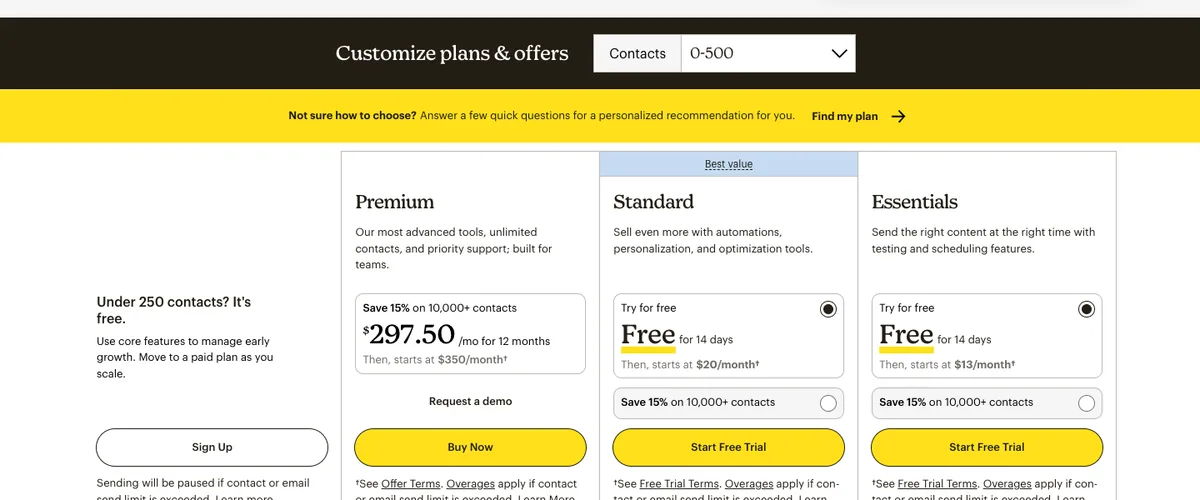
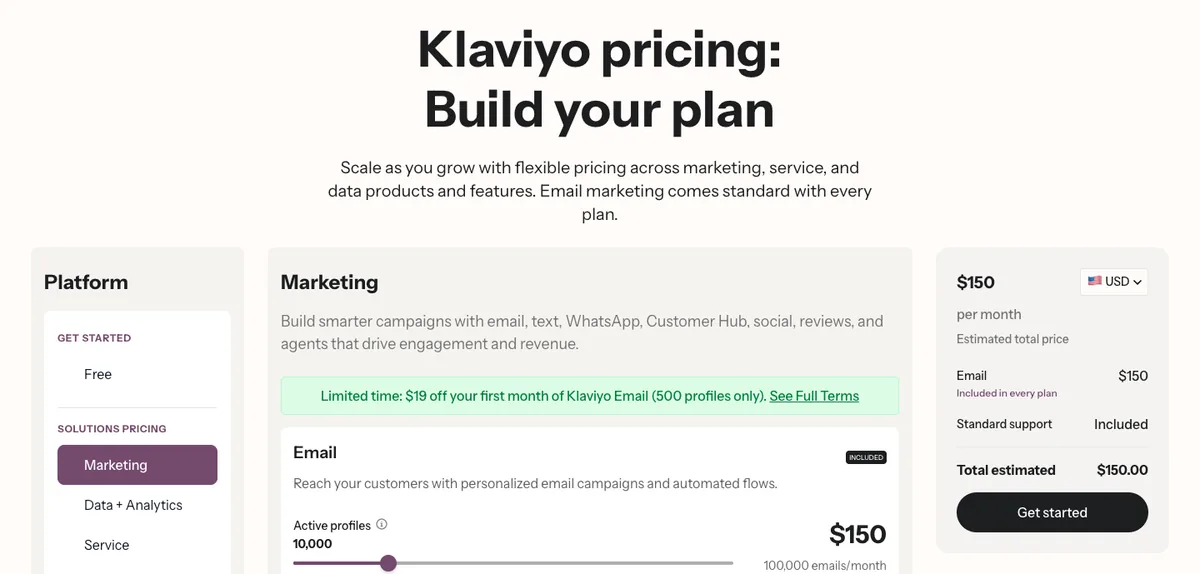
Mailchimp pricing is lower than Klaviyo’s at most list sizes, and the gap widens past 10,000 contacts. But the two count contacts differently, so compare what you’d actually be billed for, not the size of your list.
Monthly list prices in USD, from each vendor’s pricing page on 10 October 2026:
| Contacts | Mailchimp Essentials | Mailchimp Standard | Mailchimp Premium | Klaviyo (email) |
|---|---|---|---|---|
| 500 | $13 | $20 | $350* | $20 |
| 1,500 | $26.50 | $45 | $350* | $45 |
| 2,500 | $45 | $60 | $350* | $60 |
| 5,000 | $75 | $100 | $350* | $100 |
| 10,000 | $110 | $135 | $350 | $150 |
| 25,000 | $270 | $310 | $620 | $400 |
| 50,000 | $385 | $450 | $815 | $720 |
| 100,000 | Not available | $800 | $1,025 | $1,380 |
*Premium starts at 10,000 contacts, so smaller lists pay the 10,000-contact price. Both vendors also have a free plan for up to 250 contacts.
Three things the table doesn’t show:
- Who counts. Mailchimp bills subscribed, unsubscribed and non-subscribed contacts; only archived, cleaned and deleted contacts drop out. Klaviyo bills active profiles: anyone you can email, whatever their consent status, while suppressed and unsubscribed profiles don’t count. A store with 8,000 subscribers and 4,000 unsubscribes pays for 12,000 contacts on Mailchimp ($230 a month on Standard) and 8,000 profiles on Klaviyo ($150). Archive those unsubscribes and Mailchimp drops to $135.
- What’s included. Essentials caps automation flows at four steps. That’s enough for a two-email welcome series, not for abandoned cart, browse abandonment and post-purchase flows, so most stores end up comparing Klaviyo with Mailchimp Standard. Klaviyo includes flows on every plan, free included.
- Promotions. On 10 October 2026 Mailchimp’s page was offering 15% off the first 12 months, labelled for plans with 10,000+ contacts. Budget on the full price.
So: up to 5,000 contacts it’s a tie on Standard and a win for Mailchimp on Essentials. Above 10,000, Mailchimp’s list price is lower, by $270 a month at 50,000 contacts. Whether that matters depends on what Klaviyo’s flows and segmentation earn on top, and for a store where email drives a real share of revenue, that usually dwarfs the difference. Our Klaviyo pricing guide has the full tier table and the maths on when the subscription pays for itself.
Why is Klaviyo so expensive?
It charges for every profile you could email, whether or not you do. Since February 2025 your plan has to cover that full count, and if you go over, Klaviyo moves you up a tier at the next billing cycle. A list carrying years of people who never open sits a tier or two higher than it needs to, and drags down deliverability at the same time. Suppress them and you fix both. Above about 10,000 profiles, Klaviyo’s list price is also simply higher than Mailchimp Standard’s: $720 against $450 at 50,000. You’re paying for the data model, so it only makes sense if you use it. The Klaviyo pricing guide shows how to find your tier boundary and cut the bill.
Klaviyo vs Mailchimp: Pros and Cons
Klaviyo pros
- One profile per person, with every order, product view and checkout on it
- Flows on every plan, free included, with splits on any event or property
- Predicted lifetime value, churn risk and next order date, usable in segments and flows
- SMS inside the same flows and reports as email
- Only profiles you can email are billed; unsubscribes don’t count
Klaviyo cons
- Dearer than Mailchimp Standard from about 10,000 contacts ($720 against $450 at 50,000)
- Bills every emailable profile, including buyers who never subscribed
- Steeper learning curve, and stock templates are only average
- Email support ends after 60 days on the free plan
- Little advantage without store data behind it
Mailchimp pros
- Easy to learn; most teams are productive on day one
- Cheaper at most list sizes, from $13 a month on Essentials
- Decent templates and a well-rated Shopify app (4.8 stars from 1,514 reviews)
- 24/7 email and chat support on Essentials and Standard
- A good fit for newsletters, content and service businesses
Mailchimp cons
- Bills unsubscribed and non-subscribed contacts
- Essentials caps automation flows at four steps
- Each conditional split is capped at five conditions
- SMS needs approval and is sold as credits that expire monthly
- Shallower ecommerce data on the contact record
What are the weaknesses of Klaviyo?
Next to Mailchimp, the weaknesses are cost and fit. Klaviyo costs more once a list passes about 10,000 contacts, and it bills every profile you can email, including customers who bought without subscribing. It takes longer to learn, its stock templates are only average, and the free plan loses email support after 60 days. It’s built for B2C ecommerce, so a newsletter or service business pays for data it never uses. Some categories are restricted too: prescription products on every channel, and CBD and cannabis on SMS in the US and Canada. Our Klaviyo review covers each one and how to work around it.
Who Should Stay on Mailchimp
Be honest with yourself about this list:
- You’re not primarily ecommerce. Mailchimp was built for newsletters, content creators, service businesses, and B2B. If email is a broadcast channel for you rather than a revenue engine, Mailchimp is fine.
- You have fewer than 2,000 subscribers and a simple product range. The automation complexity and predictive features of Klaviyo add real value at scale. At small sizes, you won’t use most of what you’re paying for.
- Your team isn’t going to invest in learning the platform. Klaviyo has a steeper learning curve. If no one has the bandwidth to build proper flows and segments, the tool doesn’t matter.
- You sell digital products or services, not physical goods. Klaviyo’s native Shopify integration is the engine room. Without it, the advantage narrows considerably.
Leaving Mailchimp but not sure Klaviyo is the answer? For small ecommerce stores, Klaviyo’s biggest competitor is Omnisend, which is cheaper on its Standard plan and built for the same stores. Our Klaviyo alternatives guide compares twelve options by use case.
The Migration Process
Switching from Mailchimp to Klaviyo is not trivial, but it’s manageable with a proper plan:
- Install the Klaviyo-Shopify integration before doing anything else. Klaviyo syncs your last 90 days of Shopify data first, then backfills the full order history, which can take anywhere from a few minutes to several days depending on store size.
- Disconnect Mailchimp from Shopify, then connect Klaviyo’s built-in Mailchimp integration. It pulls contacts, subscription status, unsubscribes, cleaned addresses and the last 90 days of campaign engagement. Skip the disconnect and Klaviyo warns you can trigger double opt-in emails to your existing list. The Klaviyo Mailchimp integration is one-way and doesn’t carry tags, so export tagged segments from Mailchimp and import them as Klaviyo profile properties. Here’s what the Mailchimp Klaviyo integration does and doesn’t move.
- Recreate your flows. Don’t just copy; use the migration as an opportunity to upgrade your flow logic with Klaviyo’s conditional split capabilities.
- Cut over in order. Point your sign-up forms at Klaviyo, pause the Mailchimp automations, turn the Klaviyo flows live, then remove the integration. Two platforms running automations at once means customers get two abandoned cart emails.
- Warm up for the first 4-6 weeks. Don’t blast your full list on day one. Klaviyo’s guidance for new accounts is to start with profiles engaged in the last 30 days and widen the window as engagement holds. Suppress contacts who have never engaged before the first send.
A clean migration for a mid-sized store (20,000-50,000 contacts, 5-8 active flows) typically takes 2-3 weeks when done properly.
The Bottom Line
Mailchimp is where most brands start. Klaviyo is where serious ecommerce email programs live.
The trigger to switch isn’t a feature checklist. It’s a business maturity question. Our target for a well-run DTC account is 30-40% of revenue from email and SMS, and that’s hard to reach on Mailchimp’s architecture at scale. When your program is stuck well below that and the next gains depend on flows and segments built on order data, Mailchimp’s ceiling will be the thing stopping you. When you need to segment your high-CLV cohort from your one-time buyers and automate a re-engagement campaign that’s different for each group, you need Klaviyo’s data model.
If you’re an ecommerce brand doing more than $1M in annual revenue and you’re still on Mailchimp, you should at minimum run a migration cost-benefit analysis on your own numbers: the price difference, the migration cost, and the flow and segment revenue you aren’t capturing today.
Want the migration handled cleanly, without losing subscribers, breaking flows, or torching deliverability? Our Mailchimp to Klaviyo migration service takes 2-3 weeks, has a fixed scope, and includes a free pre-migration audit. Or book a free audit and we’ll model your specific revenue uplift before you commit to anything.
Sources
- Klaviyo, Pricing (email plans and mobile messaging calculator, 1 and 10 October 2026)
- Klaviyo Help Center, How Klaviyo billing works
- Mailchimp, Marketing Plan Pricing (10 October 2026)
- Mailchimp, About Mailchimp Pricing Plans
- Mailchimp, About SMS Marketing Credits
- Shopify App Store, Klaviyo: Email Marketing & SMS and Mailchimp Email SMS Marketing (ratings, 10 October 2026)
- Klaviyo, Ecommerce Benchmarks
- Klaviyo, Abandoned Cart Email Benchmarks
- Klaviyo Help Center, How to migrate from Mailchimp
- Klaviyo Help Center, How to warm your sending domain
- Mailchimp, About Your Contacts
- Mailchimp, Use Conditional Split Rules
- Mailchimp, About Customer Lifetime Value and Purchase Likelihood
/ Frequently Asked Questions
Q.01 What's better, Mailchimp or Klaviyo? +
/ Answer
For an ecommerce store that sells physical products and wants email and SMS to drive repeat purchases, Klaviyo. Every order, product view and checkout lands on one customer profile, and its flows and segments can use all of it. For newsletters, content sites, service businesses and small lists, Mailchimp is easier to learn and usually cheaper. The deciding question is whether email is a revenue channel or a broadcast channel for you.
Q.02 Is Mailchimp cheaper than Klaviyo? +
/ Answer
On list price, from about 10,000 contacts up, yes. As of 10 October 2026, Mailchimp Standard is $135 a month at 10,000 contacts against $150 for Klaviyo's email plan, and $450 against $720 at 50,000. Up to 5,000 contacts they are level on Standard ($100 each at 5,000), and Mailchimp Essentials is cheaper still but caps automation flows at four steps. Mailchimp also bills unsubscribed contacts and Klaviyo does not, so compare billable contacts, not list size.
Q.03 Who is Mailchimp's biggest competitor? +
/ Answer
It depends on who is buying. For ecommerce stores it is Klaviyo, with Omnisend as the cheaper ecommerce option. For newsletters and creators it is MailerLite, Kit (formerly ConvertKit) and Beehiiv. For large lists you email rarely it is Brevo, which prices on emails sent rather than contacts. For B2B teams that want a CRM alongside email it is HubSpot and ActiveCampaign.
Q.04 Who is Klaviyo's biggest competitor? +
/ Answer
It depends on the job. For small ecommerce stores it is Mailchimp and Omnisend, and Omnisend is the closest like-for-like option for Shopify brands at growth stage. For SMS it is Attentive and Postscript. At enterprise scale it is Braze, Iterable and Salesforce Marketing Cloud. For B2B and sales-led teams it is HubSpot and ActiveCampaign.
Q.05 Is Klaviyo better than Mailchimp for Shopify? +
/ Answer
For most Shopify stores that want automated revenue, yes. Both have well-rated Shopify apps: Mailchimp's has 4.8 stars from 1,514 reviews and Klaviyo's 4.7 from 3,366, as of 10 October 2026. The difference is depth. Klaviyo puts orders, products, checkouts and on-site browsing on one profile in real time and backfills your order history, which is what powers abandoned cart, post-purchase and predictive segments. Mailchimp covers the basics well for stores that mainly send campaigns.
Q.06 How long does it take to move from Mailchimp to Klaviyo? +
/ Answer
For a mid-sized store with 20,000 to 50,000 contacts and five to eight active flows, a clean migration typically takes two to three weeks. Klaviyo's built-in Mailchimp integration imports contacts, subscription status and the last 90 days of campaign engagement, but not tags or automations, so flows are rebuilt in Klaviyo and sending is warmed up over the first four to six weeks.
Shows our articles higher in your Google results. Takes one click.